
BASIS
Basis: dekuNukem's published documentation, source repository, and Tindie listing. Not stocked here, not bench-tested here. Nothing below is a hands-on claim; the price named is the maker's, checked on the date in the buy box.
Fifteen keys is a small allowance. A macropad earns its desk space only if each key does work that a keyboard shortcut cannot, and most macropads fail that test within a month: the keys get programmed once, the layout gets forgotten, and the pad becomes an ornament with lights. The duckyPad attacks the forgetting problem directly. A small screen above the keys prints what every key in the current profile does, and each key runs a script rather than a single chord, so one press can carry a whole sequence.
01 · THE HARDWARE, HONESTLY
| KEYS | 15 mechanical switches, Gateron Green fitted by default, hot-swap Kailh sockets for MX-style 3 or 5 pin switches |
| SCREEN | 1.3 in OLED, 128 x 64, monochrome; shows the active profile and a name for every key |
| CHIP | STM32F072; the pad presents itself as an ordinary USB keyboard, so no driver is needed on any operating system |
| STORAGE | microSD card holds all profiles and scripts as files, FAT32, up to 64 GB per the documentation |
| LIGHTING | Per-key RGB under blank translucent keycaps |
| CONNECTION | USB-C, wired only |
| PRICE | $64.99 on Tindie for the base kit; mounting plates, keycaps, switches, and a cable are paid options on top |
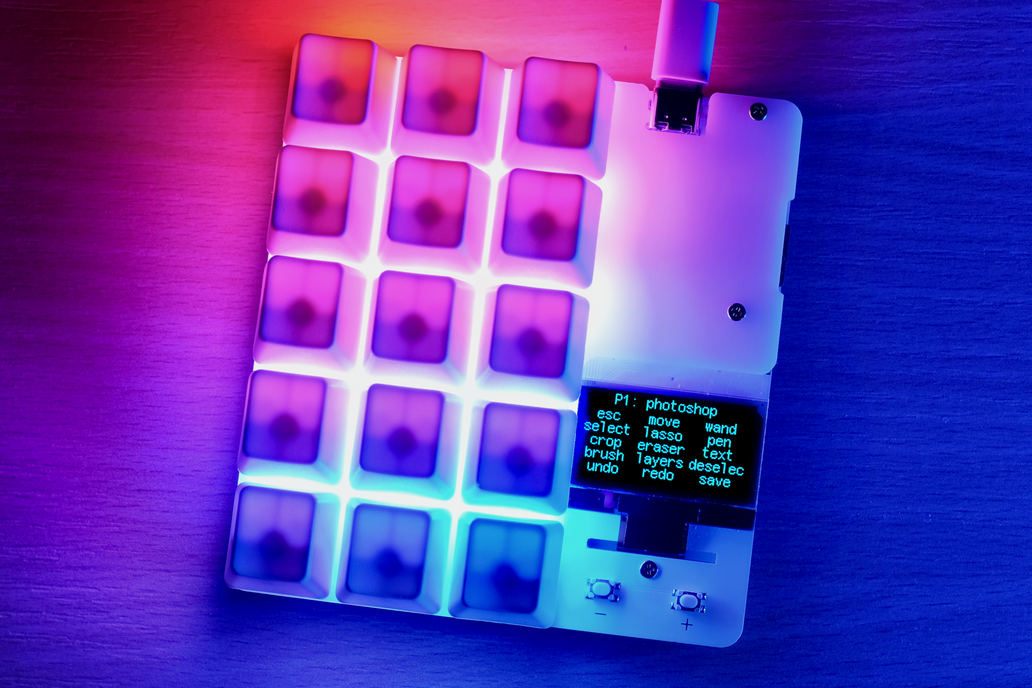
FIG. A · THE DUCKYPAD ASSEMBLED, SCREEN SHOWING A PHOTOSHOP PROFILE WITH EVERY KEY LABELED. PHOTO: DEKUNUKEM.
The kit is the first honest signal in the listing. You assemble the pad yourself from plates, board, and switches, screwdriver work with no soldering, and the maker publishes a build guide for anyone who would rather source the parts and make one from scratch. Hardware, firmware, and software are all open source. A product that expects you to build it and lets you read everything it runs is pitching to a specific kind of buyer, and it knows it.
02 · THE SCRIPT IS THE PRODUCT
Each key runs a duckyScript file. A simple script types a shortcut or a block of boilerplate. The language also carries variables, loops, and conditions, so a key can hold a sequence that reacts on the way through: open the app, wait, paste the template, fill the date, park the cursor where typing should start. Thirty-two profiles of fifteen keys give 480 scripts in total, stored on the microSD card, and the pad can switch profiles on its own when the active window changes, so the Photoshop set arrives when Photoshop does.
Where the configuration lives matters more than the count. Profiles and scripts are plain files on a removable card. Copy the card and the whole setup moves to another machine or survives as a backup in a drawer. The companion app for Windows, macOS, and Linux is open source, asks for no account, collects no data, and works offline. If the maker's store page vanished tomorrow, every duckyPad already sold would keep working exactly as it does today, which is a property most peripherals cannot claim.
03 · KEYS THAT LABEL THEMSELVES
The screen is the feature that survives contact with real habits. Layered keyboard shortcuts fail because human memory is the index, and the index rots. The duckyPad prints its index on the device: profile name at the top, then a short name for each key, in the Photoshop example in the photo running from esc and select down to undo, redo, and save. You can hand the pad to a colleague, or come back to a profile you built in March, and read what it does without opening anything.
The obvious comparison on a desk like this one is the Stream Deck Neo, which answers the same problem with eight LCD buttons and polished desktop software. The Neo is friendlier on day one, and its buttons can show pictures. The duckyPad counters with depth and custody: a script with branches in it rather than a single action per press, and a configuration you can read in a text editor on any machine you own.
04 · THE LIMITS, PLAINLY
The headline price is a starting point. Plates, keycaps, switches, and a USB cable are options on the listing, and a fully dressed order lands well past $64.99. The base kit also asks for your time twice: once to assemble it, and again every time a profile needs writing. Simple macros take minutes. Getting real value from variables and loops is tinkering, measured in evenings.
It is wired, permanently. There is no battery and no Bluetooth in this model, so the pad lives within cable reach of one machine. The screen, for all its usefulness, is 1.3 inches of monochrome text. It labels keys plainly and shows nothing else, which will feel spare next to a Stream Deck's little color tiles.
Support runs through one maker in the United Kingdom. Buyers on the listing praise his response times and his habit of shipping replacement parts without a fight, and that record counts for something. It remains one person, with one person's holidays and backlog, and shipping from the UK sets the pace for delivery.
Buy it if your repeated work has shapes a single chord cannot hold, and if you like the idea of your macros living on a card you can copy, read, and keep. If the honest inventory of your shortcuts is six chords you already know by heart, learn them properly and spend the $64.99 on something your desk actually lacks.
WHERE TO GET ONE
dekuNukem sells the duckyPad from his Tindie store. Price is $64.99 for the base kit, checked 2026-11-24, before the plate, keycap, switch, and cable options; it ships from the United Kingdom. A newer duckyPad Pro with twenty keys, rotary encoders, and Bluetooth is listed in the same store for buyers who want the larger pad. This shop does not stock either.